
UBM Word Productivity Suite
(Template + Add-in + Loader)
Overview
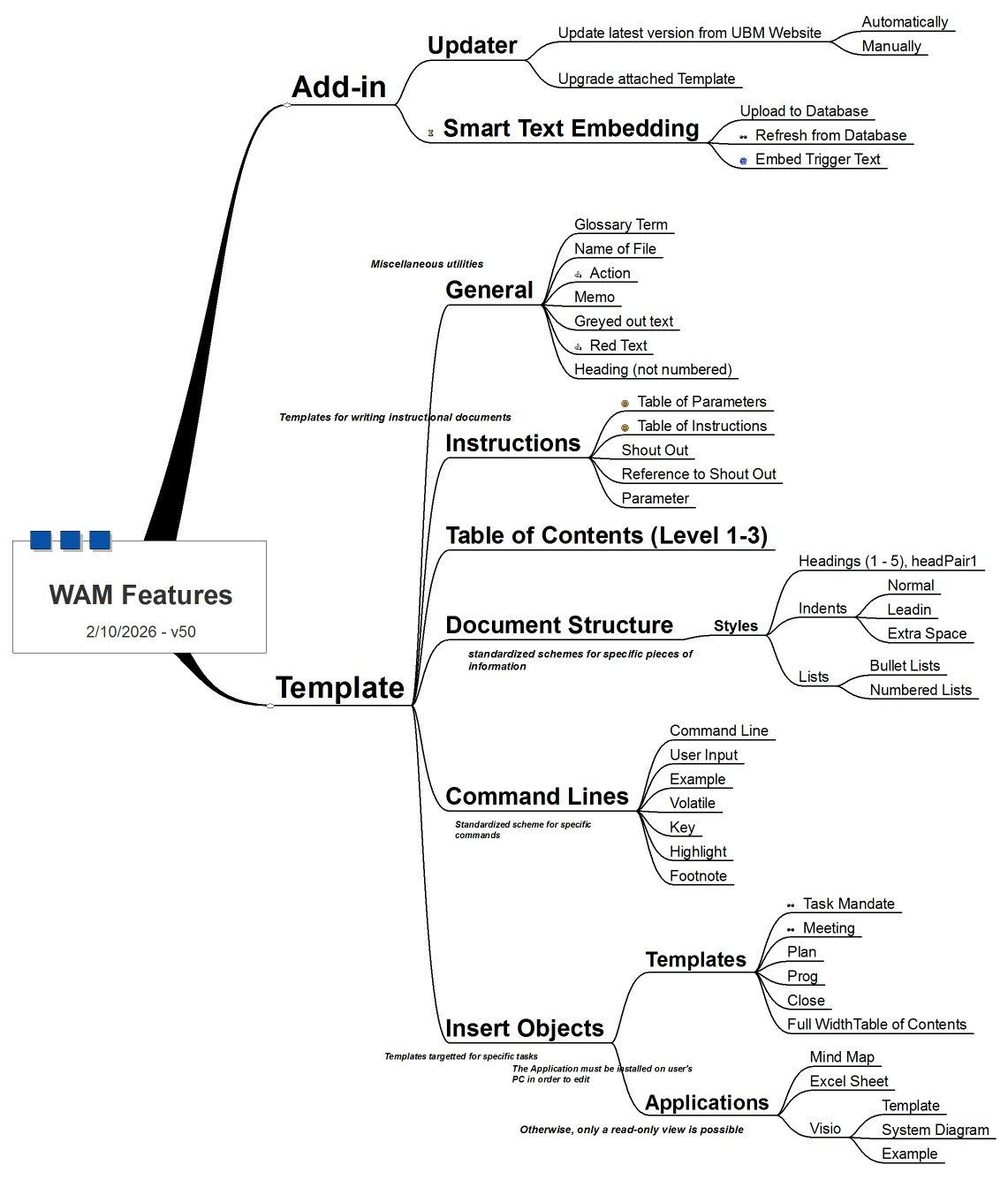
The UBM Word Productivity Suite is a set of advanced tools for Microsoft Word that streamline document creation, formatting, and automation. It consists of:
- Template– Adds productivity features, macros, and the DML menu.
- Add-in– Provides auto-update, smart text embedding, and future extensibility.
- Loader – Ensures clean versioning by removing older add-ins during Word restart.
Features
DML Menu Integration: Start Standard Document, Start Memo, control TOC levels, department header colors.
Macros & Shortcuts: Parameter tables, instruction tables, screenshots with callouts, cross-references.
Automation: Auto-update mechanism, loader for clean versioning, digitally signed macros for security.
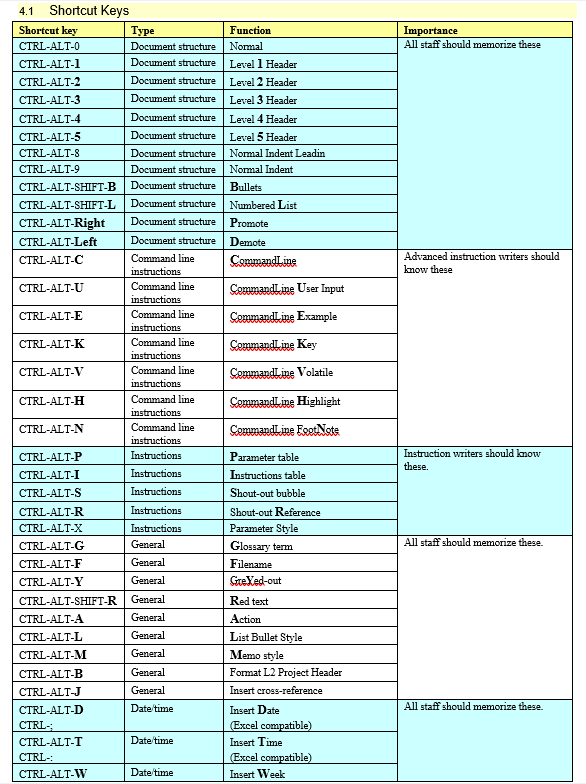
Cheat Sheet: Access shortcut list instantly with Ctrl + Shift + C
Use Cases
- Enterprise teams standardizing document formats
- Project documentation with structured headers and TOCs.
- IT teams managing version control of Word templates.
- Automated rollout of updates across departments.
- Template → Copy
UBM-2024d-Template.dotmto Custom Office Templates. - Add-in → Copy
UBM-2026a-Add-in.dotmto Word STARTUP - Loader → Copy
AAA-UBM-Loader.dotmto Word STARTUP - Restart Word → Verify DML menu appears.
- Close Word.
- Delete files from respective folders.
- Restart Word. Loader ensures old add-ins are removed.
- Download latest versions from website
- Replace files in folders.
- Restart Word to load new features.
What it does
This app makes Word easier and faster. It adds a special menu and shortcuts so you don’t have to struggle with formatting.
Template File: Ready-made layouts, styles, and tools.
Add-in File: Keeps your app up to date automatically.
Loader File: Cleans up old versions so Word runs smoothly.
Benefits
- Start a new document quickly
- Automatic table of contents.
- Easy formatting for headers, lists, bullets.
- Insert dates, weeks, screenshots, and references with one click.
- Shortcut keys save time (
Ctrl-Shift-Cshows Cheat Sheet). - Always up to date — no manual checks needed.
Cheat Sheet
- Writing memos with proper headers.
- Creating project documents with automatic TOCs.
- Adding screenshots with callouts.
- Formatting lists and bullets consistently.
- Saving time with shortcuts instead of manual formatting.
- Close Word
- Copy Template file into “Custom Office Templates.”
- Copy Add-in file into “Word STARTUP.”
- Restart Word → You’ll see a new DML menu at the top.
- Close Word
- Delete the files from folders.
- Restart Word → Menu disappears.